

Tech tip1 min read
How to Tell When Molecular Sieves Need Replacing
Non-indicating Molecular Sieves are checked by weight; replacement weights for 16mm, 35mm and 105mm film packets.
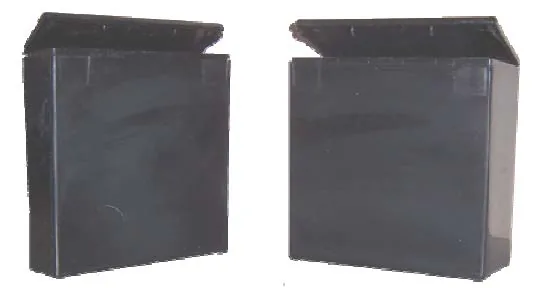
Molecular Sieves are non-indicating, so saturation cannot be seen from their appearance. The relative humidity inside the box, the rate of moisture ingress and how often the box is opened make their useful life hard to estimate.
Highlights
- The best way to detect saturation is by weight
- These desiccants absorb moisture up to about 21% of the weight of the desiccant in the packet
Replacement weights
| Film width | Initial weight | Replacement weight |
|---|---|---|
| 16mm | 3.5g | 4.24g |
| 35mm | 7.0g | 8.47g |
| 105mm | 12.5g | 15.12g |
Source:Eastman Park Micrographics(epminc.com)(opens in a new tab)
Frequently asked questions
How can the replacement time of Molecular Sieves be determined?
The best way to detect saturation is by weight.
Why can't the replacement time of Molecular Sieves be determined by appearance?
Molecular Sieves are non-indicating, so saturation cannot be seen from their appearance.
How much moisture can Molecular Sieves absorb?
These desiccants absorb moisture up to about 21% of the weight of the desiccant in the packet.
What is the replacement weight of Molecular Sieves for 35mm film?
For 35mm film, the initial weight is 7.0g and the replacement weight is 8.47g.
What are the replacement weights of Molecular Sieves for 16mm and 105mm film?
For 16mm film, the initial weight is 3.5g and the replacement weight is 4.24g; for 105mm film, the initial weight is 12.5g and the replacement weight is 15.12g.
Attachments
Comments
No comments yet. Be the first to share your view.
Leave a comment
More to read
Tech tip · Dental Imaging
Planmeca ProMax Cephalostat with ProTouch User's Manual
User's manual for the Planmeca ProMax Cephalostat with ProTouch touchscreen, for accurate head positioning and cephalometric imaging on 2D and 3D ProMax units.
Planmeca
Tech tip · Dental Imaging
ORTHOPANTOMOGRAPH OP 3D Pro User Manual
User manual and technical specifications for the OP 3D Pro digital dental imaging system with panoramic, cephalometric and Cone Beam 3D programs.
Instrumentarium Dental
Tech tip · Microfilm
Tech Tip 91: Choosing the Correct IMAGELINK Product
IMAGELINK camera, duplicating, Archive Writer and COM films and processing chemicals grouped by equipment and application, with catalog numbers.
Eastman Park Micrographics